
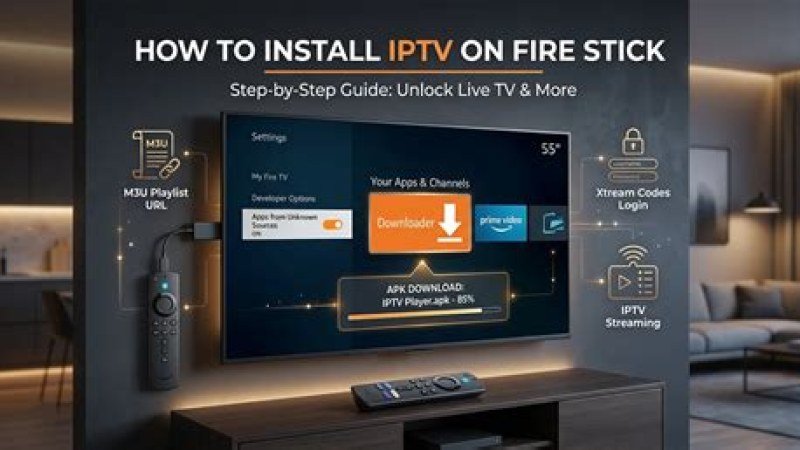
The Ultimate 2025 Guide to Installing IPTV on Amazon Firestick 4K in Canada
Are you tired of paying $120+ CAD every month to traditional Canadian cable companies just to get basic sports channels and local programming? Millions of cord-cutters across Quebec, Ontario, British Columbia, and Alberta are switching to IPTV Pro Quebec to unlock over 45,000 live channels and 150,000+ VOD titles in native 4K resolution on their Amazon Firestick 4K.
In this comprehensive tutorial, we will walk you through the exact, step-by-step setup process to install and optimize IPTV on your Firestick 4K device, ensuring buffer-free streaming across all major Canadian Internet Service Providers (ISPs).
Why Amazon Firestick 4K is Canada’s #1 Streaming Device
The Amazon Firestick 4K and Firestick 4K Max are the premier streaming devices for Canadian homes. Powered by high-performance quad-core processors, Wi-Fi 6 support, and hardware decoding for 4K HDR streams, they seamlessly render ultra-high-definition television streams with sub-second channel switching times.
When paired with IPTV Pro Quebec's 10 Gbps Canadian anti-freeze servers, your Firestick 4K delivers full access to live NHL hockey, local networks (CBC, CTV), premium sports (TSN, Sportsnet, RDS, TVA Sports), and thousands of international streams without regional blackouts or lag.
Prerequisite: Enable Developer Options on Firestick 4K
Before installing any third-party IPTV application on your Amazon Firestick, you must enable application installation from unknown sources. Follow these steps:
- Turn on your Amazon Firestick 4K and navigate to Settings (the gear icon on the far right).
- Select My Fire TV.
- Click on About.
- Highlight your device name (e.g., Fire TV Stick 4K) and press the Select button on your remote 7 times continuously until you see a prompt saying "No need, you are already a developer."
- Press the back button on your remote to return to My Fire TV. You will now see Developer Options listed.
- Open Developer Options and turn on Apps from Unknown Sources (or enable it specifically for the Downloader app once installed).
Step-by-Step IPTV Installation Guide on Firestick 4K
Step 1: Install the 'Downloader' App
To sideload the premier IPTV player application, you first need the official Downloader utility from the Amazon Appstore:
- Go back to the Firestick Home Screen and select the Find / Search icon.
- Type Downloader using the on-screen keyboard.
- Select the orange Downloader icon from the search results and click Get or Download.
- Once installed, launch the Downloader app and click Allow when prompted for storage permissions.
Step 2: Sideload Your Preferred IPTV Application
With Downloader ready, you can install top-rated IPTV media players like IPTV Smarters Pro, TiviMate, or the dedicated IPTV Pro Quebec App:
- Open Downloader and click on the URL input bar.
- Enter the official downloader code for IPTV Smarters Pro: 250931 (or enter your provider's direct APK URL).
- Click Go. The APK file will begin downloading automatically.
- Once downloaded, click Install when the pop-up appears.
- After installation completes, click Done and select Delete to remove the APK file and save internal storage space on your Firestick.
Step 3: Connect Your IPTV Pro Quebec Subscription
- Open the newly installed IPTV player from your Your Apps & Channels list.
- Select Add User / Login with Xtream Codes API.
- Enter your account details provided during your subscription activation:
- Any Name: IPTV Pro Quebec
- Username: [Sent via email/WhatsApp]
- Password: [Sent via email/WhatsApp]
- Server URL: [Provided in your activation message]
- Click Add User and allow the system to load live channels, VOD movies, and EPG TV guides.
🚀 Get Started with IPTV Pro Quebec Today!
Want ultra-fast setup assistance or a instant test line? Claim a 24-Hour Free Trial or activate your complete 4K Canadian streaming plan starting from just $14.99 CAD/month.
Why IPTV Pro Quebec Leads the Canadian Market
Not all IPTV providers are created equal. Many low-cost international services rely on overloaded servers located overseas, resulting in severe buffering during prime-time sports events like live NHL games. IPTV Pro Quebec operates private edge nodes dedicated specifically to Canadian bandwidth infrastructure.
Service Comparison: IPTV Pro Quebec vs. Generic Alternatives
| Feature | IPTV Pro Quebec | Generic IPTV / Cable |
|---|---|---|
| Canadian Edge Servers | 10 Gbps Anti-Freeze (Montreal & Toronto) | Overseas / Unstable |
| Live Channels & VOD | 45,000+ Channels / 150,000+ VOD | Limited / 720p Compressed |
| Canadian Sports Networks | TSN (1-5), Sportsnet 4K, RDS, TVA Sports | Frequent Blackouts |
| Billing Currency | Canadian Dollars ($ CAD) | USD ($ US) + Foreign Fees |
| Customer Support | 7/7 Dedicated WhatsApp Support | Email Ticket System (Slow) |
Optimizing IPTV for Canadian Internet Service Providers
Whether you receive fiber internet via Bell Fibe, Videotron Helix, Telus Optik, or high-speed cable via Rogers, Cogeco, or Starlink, network management is key to zero buffering:
- Use 5GHz Wi-Fi or Ethernet Adapter: Connect your Firestick 4K to the 5GHz Wi-Fi band or use an Amazon Ethernet adapter for maximum stability.
- Bypass ISP Throttling: Some Canadian ISPs throttle heavy video traffic during popular NHL games. IPTV Pro Quebec's encrypted protocol prevents network filtering automatically.
- Clear App Cache Regularly: Go to Settings > Applications > Manage Installed Applications > IPTV Player and click Clear Cache weekly to keep your device responsive.
Complete Access to Canadian Sports and Entertainment
With IPTV Pro Quebec configured on your Firestick 4K, you never miss local news, reality TV, or regional sports. Stream every game of the Montreal Canadiens, Toronto Maple Leafs, Vancouver Canucks, and Edmonton Oilers in crystal-clear 60fps HD and 4K. Full coverage includes TSN, Sportsnet, RDS, TVA Sports, CBC, CTV, and major US networks.